For many organizations, the quoting process feels less like a competitive advantage and more like a sales challenge. They said that products have become more customized, and pricing has become highly complex. Yet the tools they use to manage quotes often belong to an older era. When sales teams are forced to step outside their CPQ system and fall back on spreadsheets just to close a deal, they are carrying out the weight of a legacy CPQ.
CPQ modernization has evolved from a future initiative to a business imperative. Yet many organizations hesitate to replace a core system integral to their sales operations due to legitimate risk concerns.
The primary challenges that delay modernization decisions include:
- System downtime during transition
- Potential data loss or corruption
- Disrupted system integrations
- Sales team productivity impact
- Customer experience degradation
These concerns frequently result in organizations deferring critical CPQ modernization decisions for years.
The reality is this: it is possible to migrate from old CPQ systems without disrupting revenue. Organizations need to adopt a structured approach to transition to a modern CPQ while the sales keep moving. This guide explains why legacy CPQ systems hold teams back and how to modernize safely, practically, and with confidence.
The Hidden Costs of Holding onto a Legacy CPQ
Before planning a migration, it is important to understand the true cost of maintaining older quoting systems. Many organizations tolerate outdated CPQ platforms because they still “work.” But the damage they cause is often gradual and easy to overlook.
Growing Maintenance and Technical Debt
A legacy CPQ is rarely left untouched. As product portfolios expand and pricing strategies evolve, older systems require constant customization. Over time, these changes accumulate into technical debt. Simple updates start to take weeks instead of days. Pricing rules break unexpectedly. IT teams spend more time maintaining fragile logic than supporting innovation.
This maintenance burden slows the business. Every pricing change or new bundle becomes a project instead of a configuration. In contrast, a modern CPQ is designed to adapt to change without excessive customization.
Spreadsheet Workarounds and Shadow Quoting
When a legacy CPQ becomes slow or inflexible, sales teams find alternatives. They move pricing calculations to Excel sheets and discount approvals to emails. Quote templates are handled on Word or notepad.
This shadow quoting creates serious risks, leading to errors and inconsistencies. Finance teams lose visibility into margin and pricing governance. Without a single source of truth, leadership cannot trust the data coming out of the sales process.

Accelerating Sales Cycles with CPQ Strategies for Industrial Manufacturers
Slower Sales Cycles
Speed matters in competitive sales environments. Buyers expect fast, accurate responses. If generating a quote takes days instead of minutes, deals stall.
Legacy CPQ systems struggle with performance and automation. Complex configurations take too long to process while manual operations slow approvals. A modern CPQ applies rules instantly, generates accurate proposals quickly, and helps sales teams respond while interest is high.
Strategies to Migrate from Old CPQ Without Disruption
Successful CPQ modernization focuses on progress without risk. The goal is not to replace everything overnight, but to improve the future state while protecting current revenue.
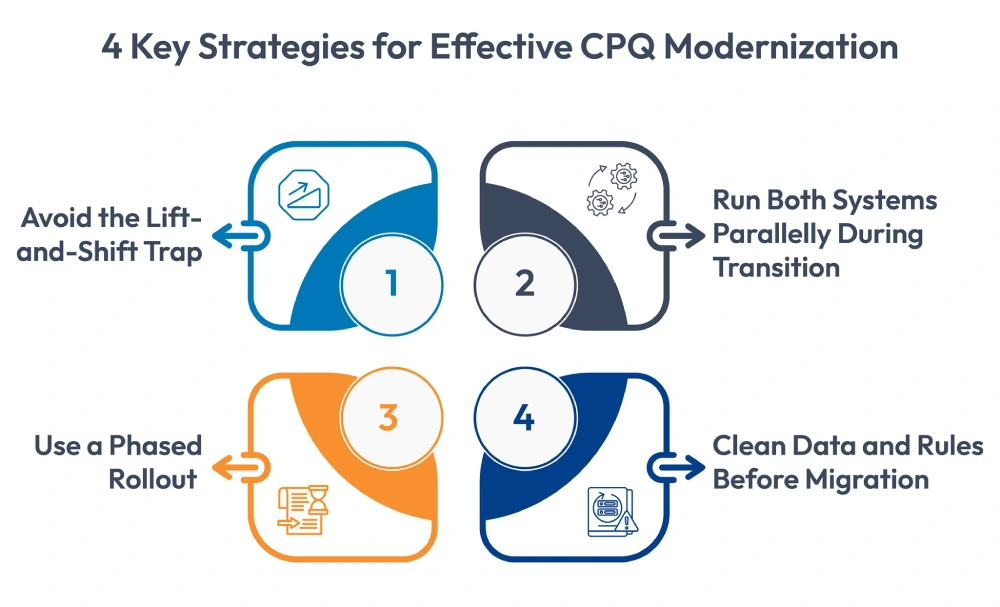
Avoid the Lift-and-Shift Trap
One common mistake during CPQ modernization is to recreate the old system exactly as it is. This approach simply moves outdated processes and poor data into a new platform without considering the changes required.
Instead, use migration as a reset point. Review existing rules and configurations with a critical eye:
- Are these product bundles still sold?
- Do we still need every approval step?
- Are pricing rules aligned with today’s strategy?
A modern CPQ handles logic more efficiently than older systems. Focus on the business outcome instead of copying legacy formulas to improve long-term maintainability.
Use a Phased Rollout
Migrating everything at once can be risky and increase the chances of a shutdown. A phased rollout allows teams to learn, adjust, and stabilize before expanding. Common phasing strategies include:
- By product line: Start with simpler offerings before moving to complex configurations.
- By region: Launch with a specific sales region to limit exposure.
- By channel: Migrate direct sales or partner sales separately.
Run Both Systems Parallelly During Transition
Running the legacy CPQ and modern CPQ in parallel is one of the safest migration approaches. For instance, a selected pilot group of sales reps will be shifted to the new system to start managing their operations, while the rest of the organization will remain on the legacy system.
During this phase, teams compare outputs from both systems. Pricing accuracy, configuration logic, and proposal formats are validated against real scenarios. Once results are consistent, additional users can transition with minimal risk.
Clean Data and Rules Before Migration
Poor or inaccurate data is a leading cause of CPQ implementation issues. Migrating this outdated product data or pricing rules can lead to problems. Before migration:
- Remove obsolete SKUs and inactive products
- Consolidate duplicates
- Document pricing and configuration rules in clear business language
This preparation ensures that the modern CPQ reduces rework during implementation.
Best Practices for a Smooth CPQ Modernization
Technology alone does not guarantee success. Adoption depends on people and process alignment.
Involve Finance, Legal, and Operations Early
CPQ outputs affect more than sales. The finance team relies on pricing accuracy. The legal depends on accurate terms and conditions. And the operations team needs accurate order data for ERP systems.
Organizations must design the process accordingly, accommodating the requirements of each team. This ensures the modern CPQ supports the full revenue lifecycle, not just quoting.
Prioritize Change Management
Even the best system could fail if it was not properly adopted by the team members. Sales teams must understand why CPQ modernization matters, so they use the system completely and gain benefits to the fullest.
Why Consider Cincom CPQ for CPQ Modernization
Cincom CPQ is a modern and robust CPQ tool designed for organizations that handle complex products and services. It offers guided selling, rule-based configuration, and 2D-3D product visualization among many other features relevant to sales teams. It integrates seamlessly with enterprise tools, including CRM, ERP, PLM, and more.
Using Cincom CPQ, Fassi Cranes, a global leader in crane manufacturing, streamlined workflows and improved efficiency across their sales and production processes. They achieved 100% accurate, error-free configurations for their highly complex product range.
Conclusion
The real risk of CPQ modernization lies in continuing to operate with a legacy CPQ that slows sales, increases manual work, and limits visibility into sales operations.
A structured CPQ migration approach reduces uncertainty and strengthens revenue operations. A modern CPQ gives sales teams speed, accuracy, and control. It provides leadership with reliable data. Most importantly, it creates a quoting process that supports growth rather than slowing it down.
FAQs
1. How long does CPQ modernization take?
Timelines vary based on complexity, but most projects can complete the modernization process quickly if they follow a structured approach. Phased rollouts often deliver value earlier.
2. Should historical quotes be migrated?
Active contracts and renewals should be migrated. Older quotes are usually better kept in a read-only legacy system.
3. How do you measure the success of CPQ modernization?
Success should be measured using clear operational and financial metrics. These include reduced quote turnaround time, improved pricing accuracy, lower approval cycle time, higher win rates, and stronger margin control.
4. Can AI support CPQ modernization?
Yes. AI tools can help analyze existing rules, identify dependencies, and reduce manual discovery during migration.