Why is a CPQ Demo Critical Before Purchase?
Research suggests that businesses using CPQ software see 17% increase in conversion rates. The stat clarifies why investing in a CPQ solution can prove to be extremely beneficial for your sales team. However, choosing the right solution among so many options is challenging.
A demo, no doubt, gives you the opportunity to explore features, usability and understand if it can easily integrate with your current system. But a demo alone is not enough to make the final decision as it often provides partial information. So, you need to ask some specific questions to truly understand if it is the right fit for your business.
This blog provides a 7-question CPQ checklist to evaluate the software provider before investing.
What to Look for in a CPQ Software Demo?
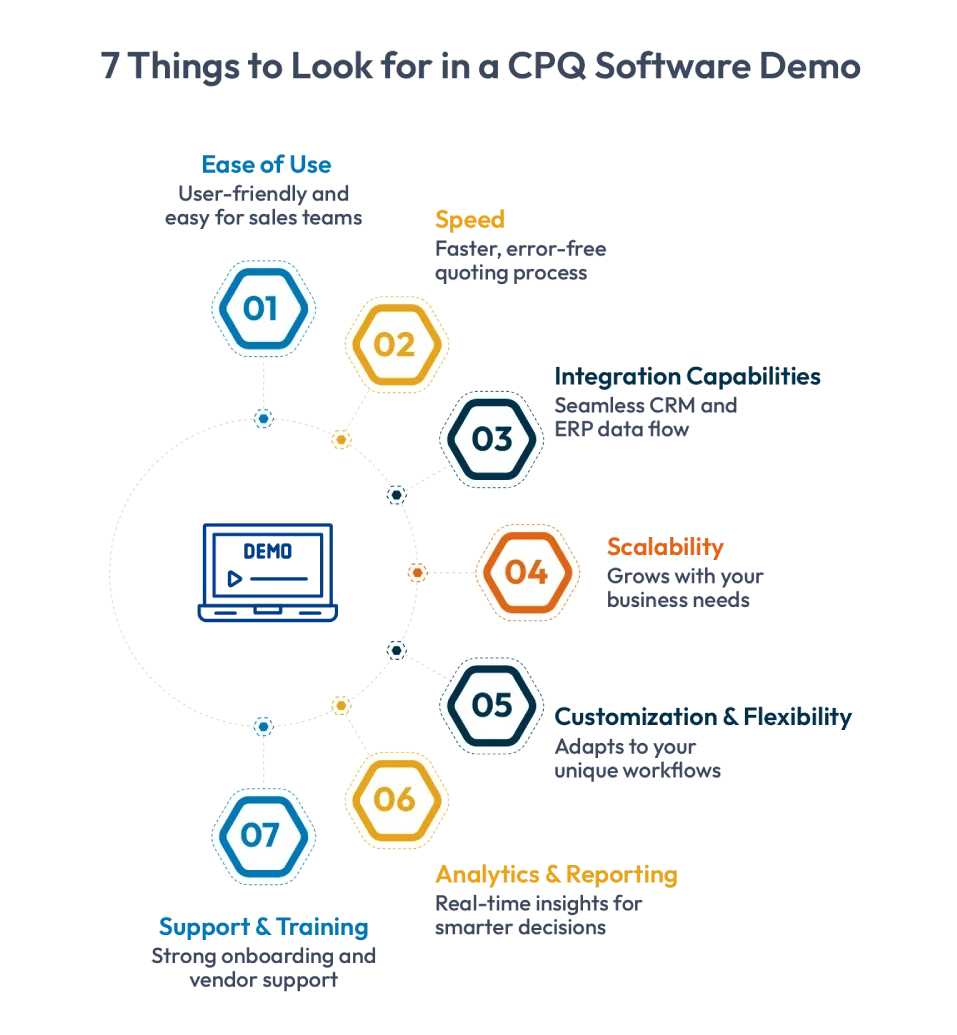
1. Ease of Use
Check whether reps can configure complex products and generate quotes easily without IT support.
2. Speed
See how quickly the system produces a complete, error-free quote from start to finish.
3. Integration Capabilities
Verify that the CPQ syncs pricing, product data, and orders seamlessly with your CRM, ERP, and other systems.
4. Scalability
Ensure the platform can support growth across product lines, regions, currencies, and user roles.
5. Customization & Flexibility
Confirm that workflows, approval paths, and pricing rules can be customized without heavy IT involvement.
6. Analytics & Reporting
Look for built-in dashboards that reveal quote performance, win rates, and customer behavior insights.
7. Support & Training
Evaluate the vendor’s onboarding, training, and ongoing support to ensure smooth adoption and long-term use.

Are you ready to put this checklist to work?
Download this ebook and experience how Cincom CPQ checks every box.
CPQ Demo Checklist: 7 Must-Ask Questions

Question #1: How Easy Is It to Configure Complex Products?
Configuration is the heart of a CPQ system. During the demo, watch closely:
- Can a rep configure a complex product without engineering support?
- Does the system prevent incorrect combinations automatically?
- Are there guided selling prompts to help users choose the right options?
- Does it pull data from CRM, ERP or CAD and PLM systems?
Easy configuration means fewer errors, no delays, and happier reps.
Tip: You can ask them to walk through a configuration that resembles your toughest product to see how it works for it.
Question #2: Can It Integrate Seamlessly with Your CRM and ERP?
One of the most important features of CPQ is its integration capabilities. During your CPQ demo, ask the vendor to show how it connects with:
- CRM (customer and opportunity data)
- ERP (pricing, inventory, production data)
- E-commerce or partner portals if applicable
Also ask:
- Are the integrations prebuilt or custom-developed?
- Does data sync instantly?
- Can updates flow both ways?
An integrated system provides the same accurate data across the organization.
Question #3: How Does It Handle Pricing Rules and Approvals?
Pricing can make or break a deal. The demo should show:
- How pricing rules are set
- Whether the system supports volume pricing, contract pricing, and discount limits
- How easy it is for reps to request approvals
- Whether managers can approve quotes via email or mobile
A strong pricing engine protects margins while speeding up quote turnaround.
Question #4: What Level of Automation Does It Offer?
Good automation means less manual work for everyone. Ask the vendor to show real examples of:
- Automatically generated quotes and proposals
- Automated workflows and approvals
- Auto-syncing of product and pricing updates
- Automatically generated BOMs or CAD drawings (if relevant)
The more a CPQ system automates, the more time your team gets back for actual selling.
Question #5: How Customizable Is the User Experience?
If the tool isn’t intuitive, your team won’t use it. See if the interface allows:
- Clean, minimal-click navigation
- Custom dashboards
- Custom product catalogs or price books
- Role-based permissions and user views
- Easy updates without heavy coding
A customizable experience means you can tailor the CPQ to your processes—not force your team to change how they work.
Question #6: What Insights and Analytics Are Available?
A great CPQ doesn’t just help you quote—it helps you understand your sales process. Look for:
- Quote conversion insights
- Margin analysis
- Rep productivity metrics
- Real-time dashboards
- Reports on bottlenecks or approval delays
Make sure these insights are easy to access and easy to interpret.
Question #7: What Kind of Support and Scalability Does It Provide?
Your CPQ should support your growing business. Ask the vendor about:
- Implementation support and onboarding
- Training (initial and ongoing)
- How often updates are rolled out
- Whether the system supports new markets, channels, or product lines
- Cloud, on-premise, or hybrid deployment options
A scalable CPQ ensures your investment lasts—and keeps delivering value long-term.
Ready to see Cincom CPQ in action?
See how Spirax Sarco boosted proposal generation by 40% and cut quote time from 10 days to 15 minutes with Cincom CPQ.
Making the Most of Your CPQ Demo
The main purpose of taking a CPQ demo is to see whether the solution truly fits your business. A good demo should show how the platform supports your sales process, integrates with your systems, and scales as you grow.
This 7-question CPQ demo checklist can help evaluate each vendor properly and take the best decision for your business.
Talk to an expert today and experience how Cincom CPQ simplifies configuration, accelerates quoting, and drives sales success.
FAQs
1. What is a CPQ demo checklist?
It’s a simple set of questions and criteria that helps teams evaluate CPQ vendors more objectively during demos.
2. Why are CPQ demos important before making a purchase?
They show you how well the system works for your real-world quoting needs—not just ideal scenarios.
3. What key features should I test during a CPQ demo?
Configuration, pricing, automation, reporting, integration, and user experience.
4. How do I compare multiple CPQ vendors effectively?
Use the same checklist for all demos, take notes, and score each area based on your priorities.
5. What questions should I ask to ensure a good implementation fit?
Ask about onboarding, customization, integration timelines, training, and ongoing support.