In industrial equipment manufacturing, every customer wants something different. They want products that match their exact needs. This makes quoting difficult. Each new configuration often needs an engineering review.
Drawings must be created, parts checked, and costs estimated. This process slows everything down. Sales teams wait for approval. Customers wait for quotes. In some cases, the deal is lost before a quote is ready.
This constant back-and-forth between sales and engineering is one of the biggest obstacles manufacturers face today. When CAD, PLM, and CPQ systems work together, quoting becomes faster, simpler, and far less dependent on engineering resources.
The Role of CAD and PLM in Manufacturing
Computer-Aided Design (CAD) is used by engineers to create product designs. These designs show how each part fits together. They are the foundation for building and assembling the product. CAD defines how the product looks and works.
Product Lifecycle Management (PLM) stores all product information. It manages design files, parts lists, and version history. It ensures that everyone works with the correct data.
Together, CAD and PLM hold the technical details of every product. However, they mostly exist within engineering. Sales teams, who work directly with customers, often can’t access this information. That separation leads to delays, errors, and constant dependency on engineering just to get a quote out the door.

Why CAD and PLM CPQ Integration Changes Everything
CPQ systems were created to simplify complex sales processes. They help salespeople configure a product, calculate accurate pricing, and prepare professional quotes. However, CPQ alone cannot confirm if a configuration is technically correct. It can only work with the data it has.
That’s where CAD CPQ integration comes in. When CPQ connects directly with PLM and CAD, it gains access to real product data and design rules. The system instantly knows what configurations are possible, and which ones aren’t.
So, when a salesperson enters a request, CPQ can validate it automatically. It can even trigger automated drawing generation, using CAD templates and engineering logic. The quote that once needed several days of review can now be produced in minutes—and it’s accurate from the start.
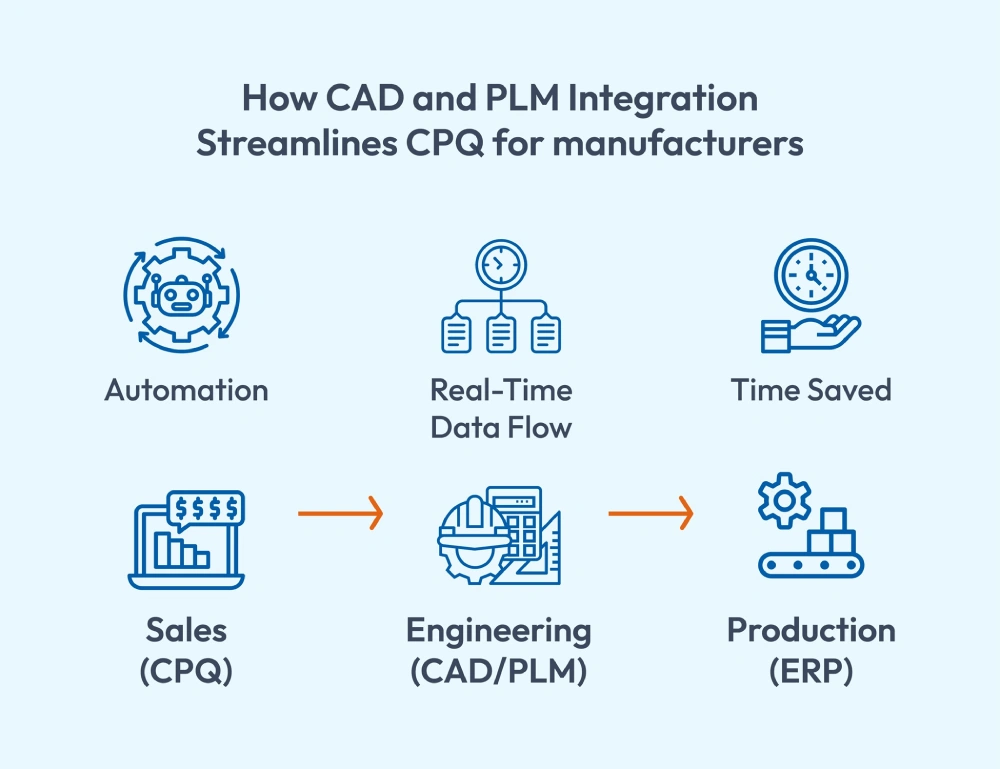
Integration creates one flow of information—from engineering design to sales quoting.
How CAD and PLM CPQ Integration Speeds Up the Quote-to-Order Process
Let’s picture the traditional process. A customer requests a custom piece of equipment. Sales reps fill out a form and send it to the engineering team. Engineers check if the request is even possible. They open CAD, adjust a model, confirm materials, and calculate costs. After several revisions, the quote goes back to sales. By then, the customer might already have a quote from somewhere else.
Now, compare that to an integrated setup.
Sales reps enter the request directly into CPQ. The system verifies it against PLM data. It knows what materials are available, which options are compatible, and what the cost should be. If it’s valid, the system automatically generates a drawing from CAD. Within hours, the customer receives a complete quote, including price, model, and documentation included. Engineering doesn’t need to get involved in every order. They step in only when a design truly requires their expertise.
The Impact on Accuracy, Efficiency, and Teamwork
Less Engineering Time for Quotes
Sales can handle more on their own. Engineers can finally focus on innovation instead of administrative work.
Fewer Errors
Since CPQ pulls data directly from PLM, there’s no risk of outdated pricing or incorrect parts. Every quote is aligned with the latest design information.
Clearer Communication
Everyone works with the same product data. The sales reps know exactly what is possible. Engineering doesn’t have to recheck everything.
Better Customer Experience
Customers get detailed quotes quickly, often with 3D visuals that make the purchase easier to understand. They see exactly what they’re getting, and that builds confidence.
Key Features to Look for in a CAD and PLM CPQ Integration
When selecting a CPQ platform, here are the key features to look for:
- Automatic Configuration Checks: The system should use rules from PLM to ensure valid configurations.
- Drawing Generation: The ability to produce CAD models or drawings from configured products.
- Real-Time Data Updates: Any change in PLM or CAD should appear instantly in CPQ.
- Automatic BOM Creation: The system should create accurate bills of materials during the quote.
- Open Integration Support: It should connect easily with your existing CAD and PLM tools.
Common Challenges and How to Overcome Them
PLM and CAD CPQ integration can be challenging for organizations that handle complex products. Here are common challenges that you should consider:
- Data Clean-Up: In many companies, product data isn’t consistent. Files are named differently. Part structures vary. Cleaning and organizing data before integration prevents major issues later.
- Team Readiness: Some teams are used to doing things manually. Introducing automation takes communication and training. People need to see how the new system helps, not replaces, their work.
- System Compatibility: Not every tool connects easily. Choosing a CPQ solution designed for PLM and CAD integration reduces the effort. It also makes long-term maintenance easier.
Where Cincom CPQ Fits In
Cincom CPQ connects seamlessly with CAD and PLM environments. It brings engineering precision directly into the sales process. With Cincom CPQ, manufacturers can:
- Generate drawings and 3D models automatically from sales inputs.
- Validate configurations instantly using data from PLM.
- Access current product and pricing data without manual updates.
- Transfer accurate BOMs to ERP or production systems.
This removes manual work, speeds up quotes, and keeps every team aligned. Cincom CPQ helped a leading air movement and control equipment manufacturer by building a cutting-edge “field-to-factory bridge” that automated processes, reducing order entry time from two days to just two minutes and enabled seamless integration.
Conclusion
Quoting configurable industrial equipment doesn’t have to be slow or complicated. CAD and PLM CPQ integration connects sales and engineering through one continuous data flow.
Sales teams can generate accurate quotes without waiting. The engineering team gets its time back. Customers get answers without waiting.
Integration is more than a technical upgrade. It’s a practical shift in how work gets done. One where information flows easily, errors shrink, and every quote reflects exactly what can be built. That’s what efficiency should look like in modern manufacturing.
FAQs
1. Why does quoting take so long for industrial equipment manufacturers?
Every customer wants the product to be personalized, which makes quotes slightly different every time. Sales reps usually need engineers to confirm if the custom request can actually be made. That back-and-forth takes time and often causes delays in quoting.
2. What exactly does CAD do in the quoting process?
CAD creates the product’s visual and structural design. When it connects with CPQ, those same designs help generate drawings and models automatically for every configuration. It saves hours of manual work.
3. Why is PLM important when creating quotes?
PLM keeps all product details, such as drawings, materials, part lists, and updates, in one place. PLM integration for configurable products ensures sales teams don’t have to guess every time. Every quote will be based on the most accurate and current data.
4. How does CAD and PLM integration eliminate delays?
Integration allows CPQ to access real engineering data. It automatically validates configurations, generates drawings, and calculates costs. This reduces manual checks and engineering dependence.
5. How does Cincom CPQ fit into all of this?
Cincom CPQ connects CAD, PLM, and sales into one smooth flow. It automates drawings, validates configurations in real time, and transfers data directly to production. It’s built to handle complex, configurable products with precision and speed.