Introduction
The one-size-fits-all days are long gone. In complex manufacturing, whether it’s industrial equipment, medical devices, or specialty vehicles, each deal involves highly variable configurations, engineering constraints, and strict compliance requirements. Quotes must be fast, accurate, and customized to meet specific needs.
To manage such complexities, manufacturers are increasingly adopting CPQ software. However, without following CPQ best practices, or a proper strategy, CPQ can fail to deliver the expected results.
To realize true ROI, CPQ must be implemented with intent. That means aligning the platform with your business processes, systems, and sales goals from the very beginning. That’s where CPQ best practices become critical to success.
In this blog, we’ll walk you through the 7 CPQ best practices every complex manufacturer should follow to speed up quote-to-order cycles, reduce errors, and build a scalable, future-ready sales process.
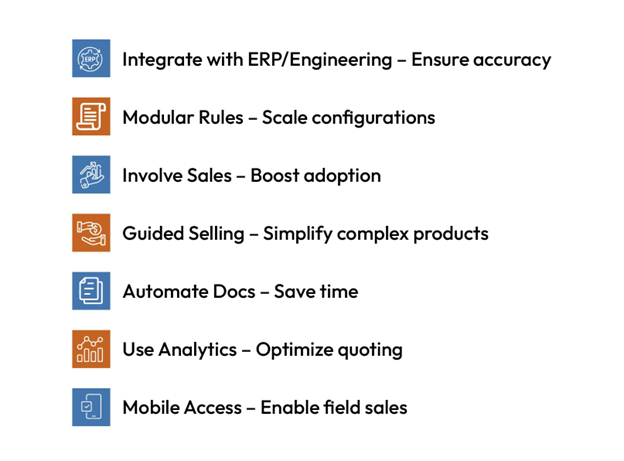
Best Practice #1: Align CPQ with Engineering and ERP Systems
Why It Matters
CPQ must connect seamlessly with engineering and back-office systems to ensure accuracy across the entire sales and production process. This is one of the foundational best practices to implement CPQ effectively.
Key Systems to Integrate
- CAD: For up-to-date design specs and constraints
- PLM: For version control and product rules
- ERP: For pricing, inventory, and fulfillment details
Benefits of Integration
- Prevents quoting of outdated or unbuildable configurations
- Reduces errors and approval delays
- Aligns sales only with what can be produced and delivered
- Speeds up quote-to-order cycle by providing real-time data access
Real-world Tip
Use real-time APIs or middleware to enable dynamic, bi-directional data flow between CPQ and other enterprise systems.
Summary: Integrating CPQ with core systems ensures real-time accuracy, seamless workflows, and faster quoting—cornerstones of successful CPQ deployment.
Best Practice #2: Build Modular Product Rules and Logic
Why It Matters
In complex manufacturing, products often have thousands of possible configurations. A rigid, hardcoded rule system becomes hard to maintain and scale.
What Modularity Means in CPQ
- Break down configuration logic into reusable rule blocks
- Create independent modules for features like sizing, compatibility, and region-specific constraints
- Update one rule set without disrupting the entire system
Benefits of Modular Product Logic
- Simplifies updates and maintenance
- Supports faster rollout of new products or variants
- Increases flexibility when serving diverse markets
- Reduces errors in configurations and pricing
Real-world Tip
Design your CPQ logic like software—modular, testable, and reusable. This reduces reliance on IT and keeps sales agile as your product catalog grows.
Summary: Modular rule design boosts maintainability, accuracy, and speed in configuration workflows. It’s one of the most scalable CPQ best practices for complex manufacturers.

Accelerating Sales Cycles with CPQ Strategies for Industrial Manufacturers
Download this whitepaper to know how the industrial manufacturers are using the CPQ software to transform sales performance.
Best Practice #3: Involve Sales Reps in the Configuration Process Design
Why It Matters
Sales teams are the ones using CPQ daily. If the configuration process is too complex or not aligned with how they sell, adoption will suffer.
How to Include Sales Input
- Conduct workshops or interviews with top-performing reps
- Observe real-world sales calls or quoting sessions
- Include sales in user testing during CPQ rollout
Benefits of Involving Sales
- Increases user adoption and satisfaction
- Reduces training time and workarounds
- Improves configuration flow and customer experience
Real-world Tip
Let sales test early versions of the CPQ interface and provide feedback. Their input ensures the tool reflects real-world selling conditions.
Summary: Involving sales early drives higher adoption, better UX, and more accurate quoting. A key part of CPQ implementation best practices is ensuring alignment between sales strategy and system logic.
Best Practice #4: Create Guided Selling Workflows for Complex Products
Why It Matters
Complex products often overwhelm buyers and sales reps with too many options. Guided selling simplifies the experience.
What Guided Selling Looks Like
- Step-by-step questions that lead reps or customers to the right configuration
- Visual aids like diagrams, images, or 3D models
- Smart defaults and recommendations based on industry or use case
Benefits of Guided Selling
- Reduces quote errors and back-and-forth with engineering
- Accelerates quote creation, even for new or junior reps
- Builds buyer confidence through a consultative experience
Real-world Tip
Use guided selling to enforce compliance and logic—not just to simplify UX. It ensures every quote aligns with business rules and regulations.
Summary: Guided Selling ensures faster, compliant quotes and improves the buyer experience—making it one of the most user-centric CPQ best practices.
Best Practice #5: Automate Document and Proposal Generation
Why It Matters
Manually creating quotes, proposals, and contracts is time-consuming and error-prone—especially in high-stakes B2B sales.
What to Automate
- Technical quotes with product specs
- Commercial proposals with pricing and terms
- Compliance or legal documentation
- Bills of materials (BOMs) for manufacturing
Benefits of Automation
- Saves hours per deal
- Ensures consistency and brand alignment
- Minimizes human error
- Speeds up sales cycles
Real-world Tip
Use dynamic templates that auto-fill based on quote details. This allows reps to generate professional documents in seconds.
Summary: Automation saves time, ensures accuracy, and shortens sales cycles. It’s a critical element in any successful CPQ deployment.
Best Practice #6: Use Analytics to Optimize Quoting Performance
Why It Matters
CPQ isn’t just a quoting tool—it’s a data engine. Leveraging CPQ analytics reveals what’s working, what’s stalling, and what can be improved.
What to Track
- Average quote creation time
- Common configuration errors
- Win/loss rates by product bundle
- Approval delays and bottlenecks
Benefits of CPQ Analytics
- Data-driven decisions for pricing, discounting, and product strategy
- Identifies training needs or rule inefficiencies
- Improves forecast accuracy and sales productivity
Bonus capability
Predictive CPQ can suggest ideal configurations or pricing based on past deals, boosting win rates.
Real-world Tip
Build dashboards for different stakeholders—sales, product, and finance—to unlock CPQ’s full strategic value.
Summary: Analytics turns CPQ into a continuous improvement engine for sales and operations, supporting CPQ implementation best practices through ongoing optimization.
Best Practice #7: Ensure Mobile and Remote Accessibility for Field Sales
Why It Matters
Manufacturing sales often happen in the field—at client sites, trade shows, or service visits. CPQ must work wherever your reps are.
What Mobile-ready CPQ Should Support
- Offline configuration and quoting
- Mobile-responsive interfaces
- Instant quote generation and sharing
Benefits of Mobile Access
- Speeds up response time during in-person meetings
- Enhances customer experience with real-time answers
- Reduces missed opportunities due to system limitations
Real-world Tip
Choose a CPQ solution that’s optimized for tablets or mobile browsers and supports cloud sync when internet is restored.
Summary: Mobile-friendly CPQ empowers field teams to sell anywhere, anytime—an often overlooked but vital CPQ best practice.
Final Thoughts
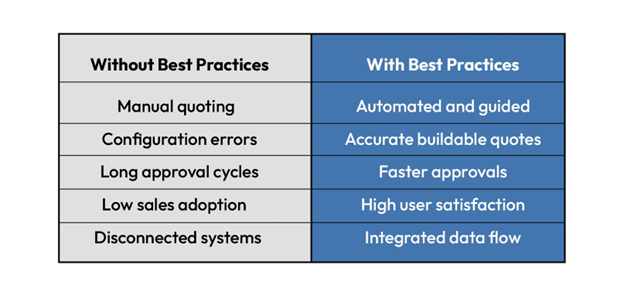
In complex manufacturing, when you implement CPQ, you not only automate quotes, but you also improve your overall sales process. When properly aligned, CPQ can drive faster and precise quoting, reduce errors, and increase margins.
By applying proven CPQ best practices, manufacturers can shorten sales cycles, enhance customer confidence, and improve overall efficiency. Following these best practices to implement CPQ ensures the platform delivers measurable results.
If your current CPQ system isn’t delivering, it may be time to reassess your setup or define a roadmap tailored to your needs. With the right strategy and CPQ implementation best practices, CPQ becomes a tool for measurable growth and smarter selling.
If your existing CPQ solution isn’t performing, perhaps it is time for a re-examination of your setup or to define a roadmap specifically for your requirements.
Cincom CPQ is specially designed for complex manufacturing and with the right strategy, it can bring unthinkable results for your business. For any query Contact Us or Schedule a Demo!
FAQs
1- What makes CPQ implementation different for complex manufacturers?
It must handle complex configurations, engineering rules, and compliance issues. Success depends on deep integration with ERP/CAD/PLM and following tailored CPQ best practices.
2- Can CPQ integrate with custom ERP systems?
Yes. Most CPQ platforms, including Cincom CPQ, support API-based integration with custom or legacy ERPs for real-time pricing, inventory, and order sync.
3- How does visual configuration help sales?
It lets reps and buyers see the product as they build it—reducing errors, speeding decisions, and increasing buyer confidence.
4- What’s the ROI of using CPQ best practices?
Faster quotes, fewer errors, higher win rates, and larger deals. ROI improves significantly when CPQ best practices are applied during implementation.
5- How often should CPQ be updated?
Review quarterly, optimize semi-annually. Update pricing, products, and sales feedback to keep it aligned with your evolving business.
6- What types of manufacturers benefit most from CPQ software?
CPQ is especially valuable for manufacturers of complex, configurable products—such as industrial equipment, specialty vehicles, or medical devices. If your sales process involves multiple product options, engineering dependencies, or quote delays, CPQ can dramatically improve speed and accuracy.
7- How long does a typical CPQ implementation take?
Implementation time varies based on complexity, integration needs, and data readiness. For a standard deployment, it can take 3–6 months, but enterprise-level implementations may require more time for integration, testing, and training.
8- What are the key signs that we’ve outgrown spreadsheets or manual quoting tools?
- Quotes take days or weeks to generate
- Frequent errors in configurations or pricing
- Sales reps rely on engineering for every quote
- Inconsistent proposals across teams
- Difficult to scale quoting across regions or teams
If you’re facing these challenges, it may be time to move toward a structured CPQ platform.
9- Is CPQ only for internal sales teams, or can partners and distributors use it too?
Modern CPQ platforms like Cincom CPQ support external user portals, allowing channel partners, distributors, or resellers to configure and quote products within defined business rules—ensuring brand consistency and compliance.
10- How does CPQ support compliance in regulated industries?
CPQ ensures that every quote adheres to predefined rules, including regulatory, regional, or legal constraints. By automating documentation and enforcing rule-based configurations, CPQ minimizes compliance risk—especially in industries like healthcare, aerospace, or defense.
11- What kind of training is required for sales teams to use CPQ effectively?
With a user-friendly interface and guided selling features, most sales reps can get up to speed in a few hours to a few days. However, success also depends on aligning the CPQ workflow with how your reps actually sell. That’s why involving them early in design is one of the most important CPQ best practices.
12- Can CPQ handle pricing models like subscriptions, bundles, or usage-based pricing?
Yes. Advanced CPQ systems support complex pricing models, including tiered pricing, bundling, multi-year contracts, subscriptions, and usage-based billing—making them ideal for both product- and service-based offerings.