Introduction: Most Claims Delays Start with a Document
A vast amount of paperwork—estimates of damage, medical records, policy forms, and repair estimates—underlies each insurance claim. The method by which the papers are extracted, processed, and routed through the internal workflows determines the speed and accuracy with which the claims are paid out.
Despite the advances in digital intake, the majority of insurers are still depending on manual or silo-based strategies to manage documentation across the claim’s lifecycle. This often leads to slower settlements, higher errors, and increased administrative intensity.
The 2024 U.S. Claims Digital Experience Study by J.D. Power shows a stark change in customers’ behavior and expectations. There is a higher number of claims digitally submitted by policyholders, and digital claims satisfaction is higher by 17 points compared to 2023.
As needs continue to shift, insurers are seeking to opt for document workflow automation. With the automation of how documents are routed, categorized, authenticated, and approved, organizations are reducing processing cycles, enhancing accuracy, and gaining regulatory compliance.
This article highlights the business value of document management and workflow automation, identifies major implementation considerations, and outlines potential challenges in the transition phase.
What is Document Workflow Automation?
Document workflow automation is the process of employing intelligent technologies to process, direct, and manage documents via pre-established business workflow automation with the least amount of human intervention. With reference to insurance claims, it replaces scattered manual labor with an automated document workflow that rapidly moves documents via intake, validation, review, and approval.
Whereas basic digitization only scans paper documents into digital ones, an automated process for a workflow manages the entire life cycle of a document. This includes capturing the content, triggering the next activity, enforcing regulatory requirements, and ensuring that the right information reaches the right stakeholders at the right time.
With claims operations, the approach enables the handling of loss reports, policy forms, repair estimates, correspondence, and regulatory notices within and across departmental systems. The result is an integrated process that is trackable and minimizes delays and errors while enhancing visibility across the claims process lifecycle.

Revamp Your Customer Communication Management with Advanced Document Generation Software
Learn how to boost efficiency, build trust, and strengthen customer relationships.
How Document Workflow Automation Is Redefining Claims Management
In today’s claims environment, success isn’t measured by speed alone. It’s defined by how well insurers allocate resources, maintain compliance, and preserve customer trust. To meet these demands at scale, leading organizations automate document workflow. Here are some of the most impactful benefits driving adoption.
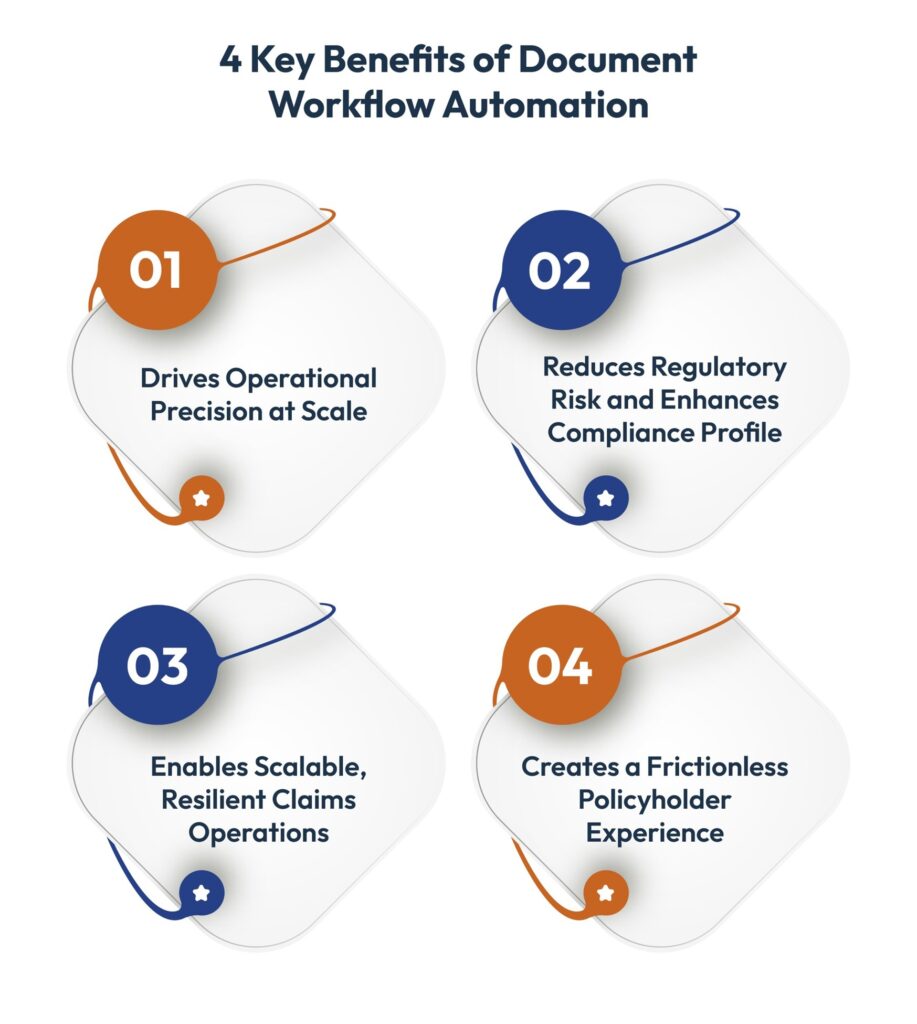
Driving Operational Precision at Scale
Reduced Cycle Time Across the Claim Lifecycle
From the First Notice of Loss (FNOL) to the final settlement, every stage of the claims process involves document movement. Automating the intake, classification, and routing of these documents trims days from the average claim duration. The result is not just faster resolution but also lower LAE (Loss Adjustment Expense) and improved resource utilization.
Enhanced Quality and Uniformity in Data
Document workflow automation software introduces consistency in how the data is extracted and keyed into main systems, reducing variability between field reports, adjuster notes, and system-of-record data. This ensures that your teams are working with clean data while reducing the variability in the reserves.
Standardized Routing and Classification of Documents
Document scanning workflow automation ensures the documents are routed through claim type, policy limits, or risk triggers. This helps eliminate reliance upon human judgment at the time of intake and ensures uniformity across geographies, vendors, and partner ecosystems.
Reducing Regulatory Risk and Enhancing Compliance Profile
Incorporated Compliance Checkpoints
Most insurance companies operate across multiple jurisdictions, each with its own regulatory requirements. Workflow automation brings the logic of required forms, disclosures, and paperwork into every phase before a claim proceeds. This helps with conformance with NAIC model laws, local DOI requirements, PDF/UA, and internal audit steps.
Audit-Ready Documentation and Version Control
Every processed document is time-stamped, versioned, and traced back with full evidential integrity should a claim for legal review, regulatory investigation, or customer dispute materialize. This allows for regulatory standard compliance and reduces audit preparation time and effort.
Role-Based Access and Governance Controls
A platform for document workflow automation imposes document-based access controls corresponding to the data classification levels (e.g., PHI, PII), allowing insurers to meet the SOC 2, HIPAA, and ISO 27001 requirements. The sensitive data is secured at rest and in transit, minimizing the risk during breaches or audits.
Enabling Scalable, Resilient Claims Operations
Rapid Surge Response Capability
In case of catastrophes, the volume of claims can surge 10–20 times. Workflows become unsustainable manually. Automated document workflows take up that volume with no compromise in turnaround time while providing quicker triage, improved reserving accuracy, and seamless service quality under pressure.
Smooth Integration with Major Systems
Insurers these days rely on a digital infrastructure—policy admin systems, CRM, ERPs, and legacy claims systems. Document workflow automation software extends these systems such that documents and data flow in real time between teams.
Support for diverse document formats and channels
Whether claims come in via email, mobile app, adjuster upload, or third-party portal, automation systems automate insurance document workflows by converting content into structured formats, reducing friction at intake, and ensuring no claim is delayed due to file format or submission method.
Creating a Frictionless Policyholder Experience
Faster Insight into Claim Status and Fewer Touchpoints
With document processing workflow automation, claims forms move in seconds rather than days. That means fewer calls to the contact center, accurate status reporting, and sooner disbursements. Claimants appreciate the process as a timely, rather than a waiting game, process.
Establishing Trust with Openness and Consistency
Policyholders want to be sure that their documents are received, read, and followed up on promptly. Document workflow software imposes this standardization and assists with SLAs, enables proactive communications, and ultimately boosts NPS and retention.
How to Successfully Implement Document Workflow Automation in Insurance
Insurers are in the midst of a complex world where speed, regulatory needs, and policyholder satisfaction are interrelated. Implementing a platform for document workflow automation is not only about bringing in technology but also about re-architecting the way the information moves through your business while not jeopardizing the things that are working. Below is a step-by-step process created with large-scale insurance infrastructures in mind.
Define Automation Objectives Aligned to Business Outcomes
Before evaluating your current documentation process, articulate the core problem you’re solving. Are you aiming to reduce indemnity leakage through faster routing? Improve NAIC compliance through standardized documentation trails? Lower administrative overhead by 20%?
Objectives must be tied to business metrics, not just process convenience. Otherwise, efforts to automate document workflow risk becoming just another IT project, lacking executive sponsorship.
Audit Your Current Documentation Flow Across the Claims Lifecycle
Go beyond “process maps.” Examine where documents stall: is FNOL delayed due to email-based intake? Are medical reports re-keyed by adjusters? Where are compliance checks manual or error-prone? This step should uncover systemic friction, duplicate data entry, lost files, or audit gaps.
In most businesses, these are hidden within regional silos or legacy platform workarounds. A well-implemented document workflow software can help uncover and eliminate these bottlenecks efficiently.
Choose Document Automation Tools Built for Insurance Ecosystems
Don’t just evaluate features—assess whether the platform is designed to operate across your full insurance architecture. The right solution should support:
- Automated document creation with standardized templates
- Centralized document management with role-based access and retention policies
- Seamless integration with CMS, ECM, CRM, and policy admin systems
- Built-in compliance controls, including audit trails, version control, policy-based retention, and jurisdiction-specific document handling
- Support for secure document workflows aligned with SOC 2, HIPAA, and NAIC model guidelines
Your technology stack should not only automate document scanning workflows but also strengthen regulatory posture, reduce audit fatigue, and ensure enterprise-wide consistency in documentation practices.
Design a Workflow That Reflects Operational Realities
Ideal automation follows your actual claims flow:
Intake → Pre-check → Compliance validation → Assignment → Decision → Payout → Archiving
But don’t model this in isolation. Bring in your front-line claim handlers and compliance teams. If a step exists purely because “legal wants it that way,” build that logic into the routing. If certain files come in paper only from third-party garages or adjusters, account for that. Effective automation mirrors business complexity; it doesn’t avoid it. A robust platform for document workflow automation ensures these workflows are designed with flexibility and compliance in mind.
Integrate Deeply with Your Core Insurance Infrastructure
This is where most initiatives stall. Your document workflow software must plug into:
- Claims management systems
- Enterprise content management
- Customer relationship management software
- Other regulatory systems or audit platforms
If automation sits outside your claims core, you’re just creating another silo. Integration must be API-based, bi-directional, and allow for version control, file hierarchy, and secure handoffs. Only then can you truly automate insurance document workflows end-to-end.
Start Small, Then Build Process Champions
Roll out automation in a controlled environment, such as a single line of business or geography. But don’t limit tracking to technical metrics. Watch for where workflow automation meets resistance: Are adjusters bypassing the system to “just get it done”? Are legacy processes surviving through side-channel emails?
Appoint team members within operations—not just IT—and give them clear ownership to drive adoption from within.
Monitor in Real Time, Optimize Relentlessly
Post-launch, track metrics that matter:
- Claims cycle time (by document type)
- Touchpoint-to-resolution ratio
- SLA breaches due to documentation gaps
- Percentage of claims automated end-to-end
- Compliance readiness across jurisdictions
Use this data to identify where human judgment still adds unnecessary delay, and optimize those steps. Then scale. But only when the operational model is stable and your document workflow automation has demonstrated measurable improvements.
Five Implementation Risks You Simply Can’t Ignore
Automation of the document process can realize stunning ROI only if usual risks are controlled at an early point. Here is how forward-thinking insurers stay one step ahead.
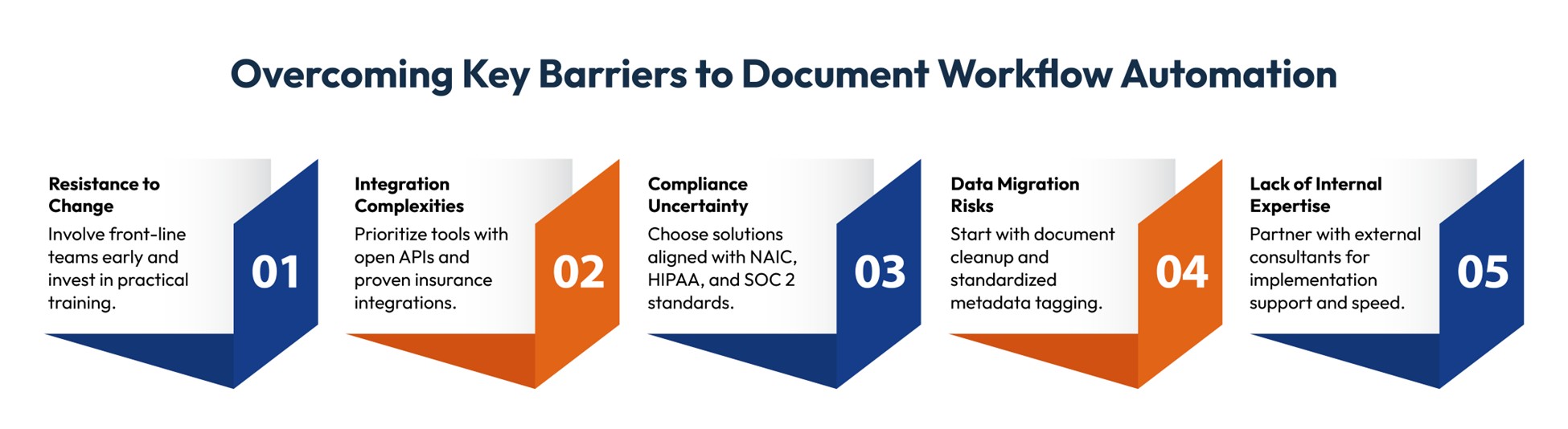
By tackling these challenges early on, insurers can minimize implementation risk, speed up adoption, and guarantee that automation leads to significant impact throughout the claims value chain.
Final Thoughts
Claims performance is no longer a function of how teams react—it’s a function of how smartly the process is architected. As we’ve talked about, document workflow automation is no longer a function of reducing paperwork. It’s a function of building a scalable and compliant claims environment with minimal friction at each stage—FNOL to final payment.
Insurers investing in document management and automated workflows are realizing measurable gains in speed, accuracy, and customer satisfaction. They are closing claims faster, improving regulatory readiness, and constructing smooth, audit-friendly processes across the enterprise.
Cincom Eloquence enables that. With intuitive document automation, extensive out-of-the-box integration, and embedded governance, it helps facilitate the modernization of complex claims workflows—without the compromise of core systems.
The technology exists. The roadmap is proven. What distinguishes the leaders is how fast they move.
FAQs
1- What is document workflow automation in claims processing?
It refers to the use of intelligent systems to manage, route, and process documents across the claims lifecycle—automating intake, validation, approvals, and archiving with minimal manual intervention.
2- How does automation reduce claim cycle times?
By eliminating manual handoffs and delays in document review, routing, and compliance checks. Automation moves documents instantly through pre-defined workflows, accelerating resolution and improving SLA adherence.
3- Is workflow automation secure for sensitive claim data?
Yes—enterprise-grade document workflow automation platforms offer role-based access, end-to-end encryption, audit trails, and full compliance with standards like HIPAA, NAIC, SOC 2, and GDPR.
4- What types of claims benefit most from automation?
High-volume, low-complexity claims, such as auto, property, and supplemental health claims, see the most immediate impact. However, even complex claims benefit from automated document management, especially for compliance and documentation tracking.
5- How do I implement workflow automation in my claims process?
Start by defining your automation goals, auditing existing documentation workflows, selecting interoperable tools, and integrating with core systems like CMS, ECM, and CRM. Pilot the process, then optimize and scale.
6- How to automate compliance documentation workflows for FDA submissions?
Use workflow automation tools that support structured document templates, approval routing, e-signatures, and version control. Ensure they align with all standard requirements and integrate with regulatory submission platforms.