Most organizations spend far too much time on documentation. Drafting, editing, and sending documents take up hours every week. That’s not all; even after spending several hours, mistakes can creep into the process.
That’s where document automation comes in. Organizations adopt the document automation process that uses a structured approach that pulls data from systems, applies it to templates, and produces finished documents automatically. A process like this saves time, reduces errors, and makes sure every file is consistent.
This article helps you understand document automation, how to automate documentation process, explore common challenges, and understand the key benefits to your organization.
What is Document Automation?
Document automation refers to the use of technology and systems to automate the process of generating documents while reducing manual work. It involves automating and streamlining various steps in documentation, including creation, editing, designing, and delivery to customers across channels.
Automated document processing software replaces repetitive and mundane work. With it, templates and connected data sources generate files for you. The platform fills in customer details, applies the right clauses, and formats everything in line with your standards.
What is the Document Automation Process?
From gathering data to sending the final document, each stage plays an important role. Understanding these steps makes it easier to see how the document automation process works in practice and where the real benefits come from.
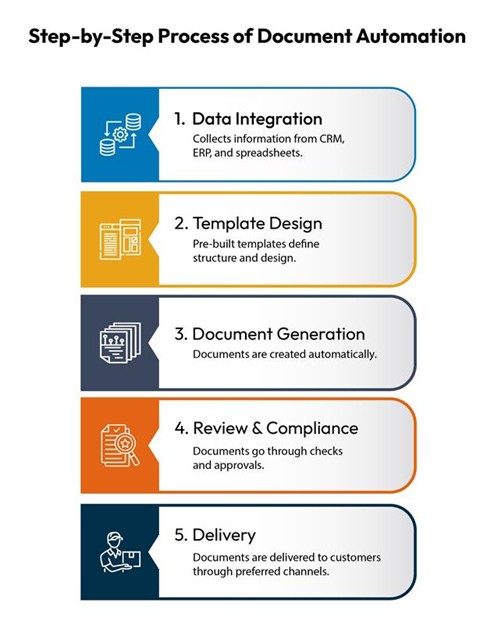
Step 1: Data Integration
Implementing document automation process starts with reliable data. Without it, automation will only repeat the same mistakes that exist in your systems.
Your CRM might hold customer names and addresses. Your ERP carries transaction records. Spreadsheets may store pricing details. All of these need to feed into your automation platform.
Connections happen through APIs or scheduled imports. Once the data flows, mapping rules make sure fields line up. For example, “customer ID” in one system may be called “account number” in another. Mapping ensures they mean the same thing in your documents.
Step 2: Templates
Templates are the backbone of the document automation process. They decide how a document looks and what information goes where.
Start by breaking down your existing documents. Spots which are fixed, such as logos, headers, disclaimers, and more. Then look at the variable fields, including customer name, product details, and pricing.
Build a library for different types of documents: contracts, invoices, reports, and letters. Use master templates for common elements and allow smaller edits for department-specific needs.
To keep things under control, use version tracking. Business rules change, and so do documents. Approval workflows help prevent errors before updates go live.

Build a smarter, more resilient omnichannel communication system
Discover how to build a smarter, more resilient omnichannel communication system.
Step 3: Document Generation
Once data and templates are in place, documents can be created automatically.
Sales reps just need to select the template, and the system automatically fetches the data as well as customer details to create documents almost instantly. Some documents like end of the month report or invoice may generate automatically, without needing human assistance.
Personalization is built in. The system can change wording, add relevant terms, or include product details depending on the recipient. For high-volume needs like monthly statements, batch generation produces thousands of files at once.
Step 4: Review and Compliance
Automation reduces errors, but a safety net is still needed. Not every document should be sent without a review.
Checks confirm that required fields are filled, calculations add up, and disclaimers are included. Any unusual values can be flagged for a human check.
Not all documents carry the same risk. A customer notification may only need one quick review. A financial statement might require several approvals. Audit trails keep a record of who reviewed and approved what, which is critical during compliance checks.
Step 5: Delivery
The final step in the document processing automation is sending documents through the right channels.
Some customers want email. Others need physical copies. Many expect access through secure portals. Mobile notifications are also becoming common.
Tracking delivery is just as important as sending. Did the recipient open the email? Download the file? Was the letter delivered? Scheduling features ensure documents are sent at the right time, taking into account time zones, deadlines, and preferences.
Key Benefits of Adopting the Document Automation Process
Businesses that move to document process automation start noticing improvements right away. Here’s what it means in practice:
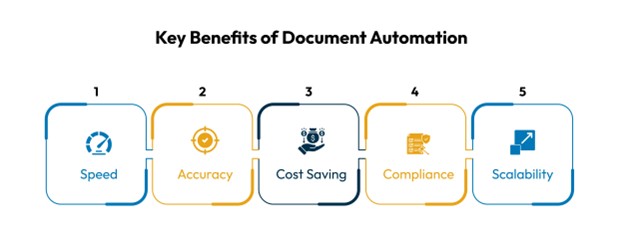
Speed: Tasks that once ate up hours can now be finished in minutes. For example, generating a customer contract or sending a claims letter no longer requires manual data entry and formatting. The system pulls the information, applies it to a template, and delivers the document instantly.
Accuracy: Document process automation eliminates chances of mistakes, like missing details, typos, and mismatched data. Every document pulls data directly from approved systems, so what the customer sees is correct and consistent every time.
Cost Saving: Document processing automation cuts down on wasted time and the cost involved in creating documents. It reduces the need for extra staff to handle high volumes and limits the money spent correcting errors.
Compliance: Regulations demand accuracy and traceability. Automated systems come with built-in audit trails, time stamps, and mandatory fields. That means documents are always created in line with company policies and legal requirements. Audits become easier because records are already organized.
Scalability: As the business grows, document management needs to grow too. Normally, that would mean hiring more staff to keep up. With automation, that’s not the case. The same system can handle thousands of additional documents without adding new headcount, making growth less costly and less stressful.
Common Challenges
While the benefits of document automation processes are clear, the path to get there often comes with challenges. Here are the most common obstacles businesses face:
- Data issues: Incomplete or inconsistent data leads to bad documents. Regular data cleanup is essential.
- Complex templates: Too many variations can overwhelm teams. Start small before expanding.
- User resistance: People used to manual work may be hesitant. Training and phased rollouts help.
- Integration hurdles: Legacy systems may not connect easily. Testing and expert support reduce friction.
How CCM Platforms Help in the Document Automation Process
Customer Communication Management (CCM) platforms bring everything together in one system by acting as a central hub for drafting, designing, and delivering documents. They manage templates, integrate with existing systems (CRM, ERP, and more), generate documents, route them for approval, and ensure they reach the right customer through the right channel. A CCM platform includes features like:
- Pre-built templates with rules and logic.
- Connectors to integrate with popular systems.
- Dashboards for tracking volume, delivery, and engagement.
For organizations looking for a CCM solution, Cincom Eloquence offers the best automated document processing services to users. It delivers all of these capabilities in a single platform, helping businesses simplify communication, reduce risk, and improve customer experiences. With Cincom, you get:
- Fast deployment and easy onboarding
- Centralized control of templates and messaging
- High ROI with lower total cost of ownership
Learn more about Cincom Eloquence or book a demo to discover compliant, high-impact customer communications.
Conclusion
Manual documentation can slow down business operations and increase the risk of errors. This can consequently result in lost customers and reduced revenue. Adopting the document automation process solves both problems. By focusing on clean data, flexible templates, and structured delivery, organizations can save time, improve accuracy, and serve customers more efficiently.
The key is to start small by picking high-volume processes like invoices and reports and automating them. Automated document processing software like Cincom Eloquence can improve how customers experience their business and support long-term growth.
FAQs
1- What is the document automation process?
Document automation process is the use of software and technology to create, manage, and deliver documents without much manual effort. It includes fetching data from existing systems and applies it to pre-designed templates.
2- How is document automation different from using templates in Word or PDF tools?
Basic templates still require manual data entry and formatting. Document automation process goes further by integrating with business systems, applying rules, and sending the document automatically.
3- What types of documents can be automated?
Almost any business document, including contracts, invoices, claims letters, onboarding forms, compliance notices, and reports, can be automated through document automation or CCM tools.
4- How do document automation processes improve accuracy?
Document automation pulls data directly from trusted systems like CRM or ERP. This reduces errors from manual entry, ensuring every document has information that is up-to-date and consistent.
5- Does document automation help with compliance?
Yes, document automated systems include audit trails, time stamps, and rules that ensure documents align with industry and regulatory requirements.
6- How quickly can a business see results after adopting an automated document processing software?
When adopting the best software for automating document processing, most organizations see improvements within weeks. Time saved on manual work and fewer errors lead to faster ROI than many organizations expect.