For many manufacturers and complex sales organizations, Excel has been the backbone of quoting for years. It feels flexible, familiar and customizable.
But as product complexity grows, that flexibility turns into fragility.
Version confusion, formula breakage, pricing inconsistencies, manual approvals, engineering rework are some of the bottlenecks that every complex manufacturer comes across.
And the operational impact of switching to a purpose-built quoting system is measurable.
According to a market industry analysis on CPQ adoption trends, organizations that invest in CPQ technology report:
- up to a 57% increase in quote accuracy,
- 43% improvement in deal closure rates, and
- faster turnaround time for generating quotes, as more than 68% of businesses plan to prioritize CPQ deployment by the end of 2024.
These figures clearly show that moving beyond spreadsheet quoting drives real results in accuracy, deal velocity, and revenue outcomes.
If you’re still quoting in spreadsheets, you’re not alone. But if growth, speed, and accuracy matter, migrating excel to CPQ becomes a strategic move.
This practical guide walks you through how to plan, execute, and optimize your transition successfully.
Why Growing Companies End Up Migrating Excel to CPQ
Though excel is powerful and familiar, it was never designed to manage:
- Multi-layered product dependencies
- Complex pricing matrices
- Tiered discount governance
- Real-time system integrations
- Enterprise-scale quoting visibility
Early in a company’s lifecycle, spreadsheets feel efficient. Over time, they become fragile.
Before organizations begin migrating excel to CPQ, what typically observed are:
- Quote cycle times creeping upward
- Pricing discrepancies increasing
- Sales requesting engineering validation on standard deals
- Finance struggling to track discount leakage
- Multiple spreadsheet “versions” circulating simultaneously
The turning point usually comes after a costly quoting error or margin loss incident. That’s when leadership recognizes that Excel is no longer a tool. Rather, it’s a risk.

How CPQ Helps Manufacturers Protect Margins and Increase Sales in Unstable Economy
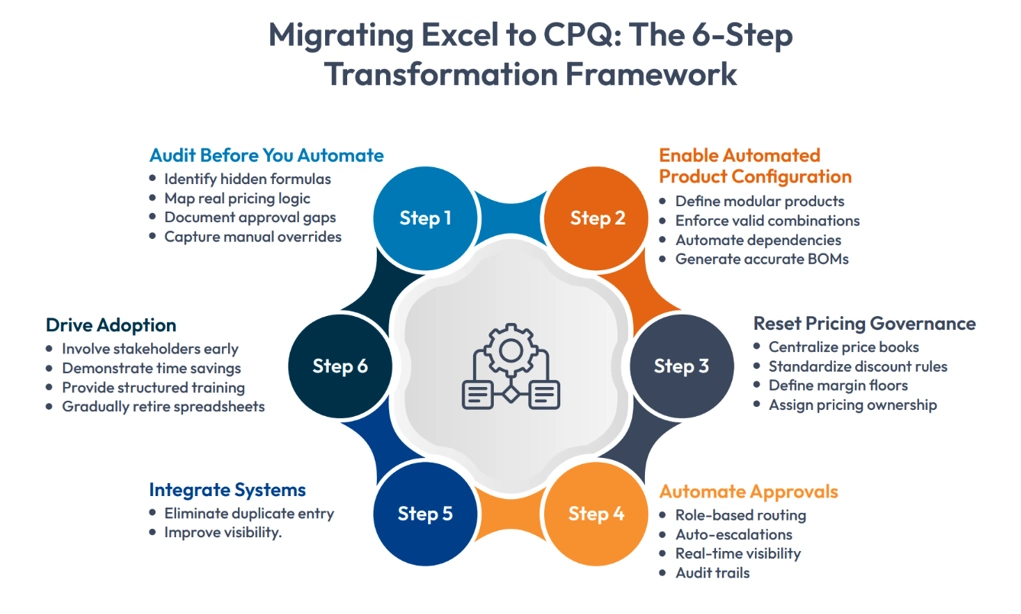
Step 1: Conduct a Deep Audit Before Migrating Excel to CPQ
The most underestimated phase of Excel to CPQ Migration is discovery.
Before migrating Excel to CPQ, you must fully understand:
- How pricing is structured (and where it’s inconsistent)
- Which configuration rules are documented, and which live in someone’s head
- How approvals actually happen versus how they’re supposed to happen
- Where manual overrides occur
Hidden spreadsheet logic is often the biggest surprise. Nested formulas, exception rules, and conditional pricing frequently exist without documentation.
If you don’t extract this knowledge properly, you risk rebuilding dysfunction inside a new platform.
Step 2: Transform Spreadsheet Logic into Automated Product Configuration
This is the most transformative part of migrating excel to CPQ.
Spreadsheets rely heavily on user judgment. CPQ relies on system-enforced logic.
Through automated product configuration, you:
- Define modular product architectures
- Establish valid and invalid combinations
- Automate dependency enforcement
- Generate accurate BOMs automatically
Automated product configuration reduces engineering involvement in sales deals to a great extent.
- Sales teams gain independence.
- Engineering regains focus.
- Errors decline dramatically.
More importantly, you begin to systematically eliminate spreadsheet errors that stem from manual oversight or outdated templates.
Step 3: Use Migration as a Pricing Governance Reset
One of the greatest advantages of migrating Excel to CPQ is the opportunity to modernize pricing governance.
In spreadsheet environments, pricing inconsistencies accumulate over time:
- Informal discounting practices
- Outdated price lists
- Hidden margin overrides
- Region-specific pricing variations
During Excel to CPQ migration, what is always recommended:
- Centralizing price books
- Standardizing discount thresholds
- Defining margin floors
- Assigning clear pricing ownership
This discipline ensures that CPQ becomes a profitability enabler and not just a quoting accelerator.
Step 4: Formalize Approval Workflows and Margin Controls
Excel-based approvals are often fragmented:
- Email threads
- Verbal approvals
- Informal exceptions
Migrating Excel to CPQ allows you to introduce structured workflow automation:
- Role-based approval routing
- Automatic escalation for low-margin deals
- Real-time visibility into approval bottlenecks
- Audit trails for compliance
In complex sales environments, this level of governance does more than eliminate spreadsheet errors. It protects strategic accounts and long-term margins.
Step 5: Integrate CPQ Into Your Commercial Ecosystem
A successful Excel to CPQ migration doesn’t operate in isolation.
CPQ must connect seamlessly to:
- CRM for opportunity context
- ERP for pricing, inventory, and fulfillment
- PLM for product rule accuracy
- Finance systems for revenue tracking
Organizations often underestimate integration complexity. But when done properly, system alignment removes duplicate data entry and significantly reduces administrative overhead.
The result is end-to-end commercial visibility.
Step 6: Address the Human Dimension of Migrating Excel to CPQ
Technology transitions fail when cultural resistance is ignored.
Sales teams often trust Excel because they built it. It feels customizable and personal.
When migrating Excel to CPQ, success depends on:
- Early stakeholder involvement
- Clear communication of benefits
- Demonstrations of time savings
- Structured training programs
- Gradual retirement of spreadsheet usage
The goal is to replace uncontrolled flexibility with governed agility and adoption determines ROI.
Common Pitfalls in Excel to CPQ Migration
The risks that generally appear are:
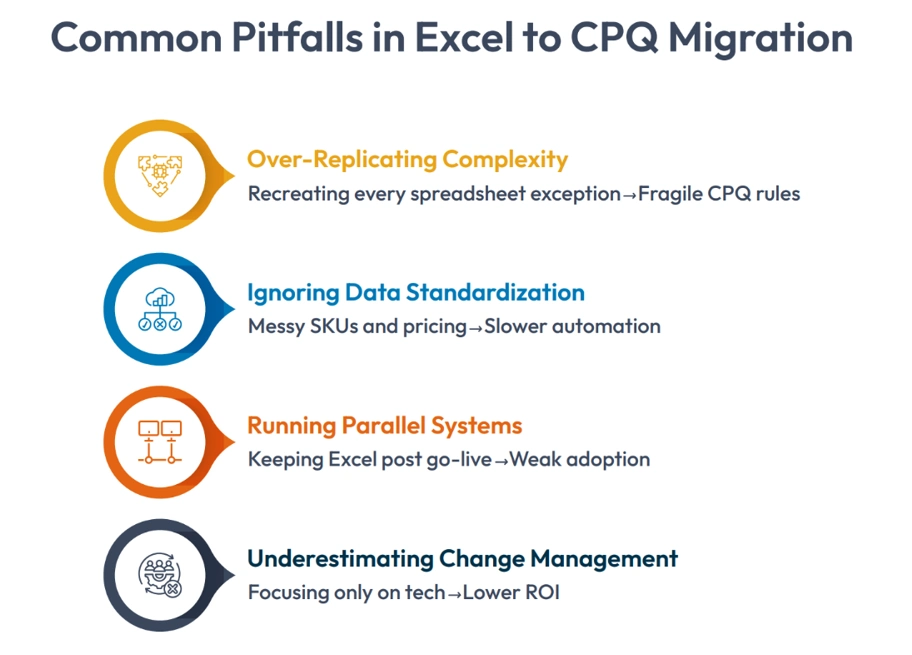
- Over-Replicating Spreadsheet Complexity: Trying to duplicate every exception increases system fragility.
- Ignoring Data Standardization: Poor SKU hygiene delays automated product configuration buildout.
- Running Parallel Systems Too Long: Allowing Excel to remain active undermines adoption and prevents teams from fully eliminating spreadsheet errors.
- Underestimating Change Management: Technical implementation alone is not enough.
A phased rollout strategy consistently delivers the best results.
See how Dennis Eagle accelerated build rates, improved quote accuracy, and unified sales and production with Cincom CPQ.
What Success Looks Like After Migrating Excel to CPQ
When Excel to CPQ Migration is executed strategically, organizations experience:
- 30–50% faster quote turnaround
- Significant reduction in pricing inconsistencies
- Lower engineering involvement per deal
- Increased margin discipline
- Improved forecasting accuracy
But the deeper impact is structural maturity.
- Sales operates within governed flexibility.
- Finance gains pricing transparency.
- Engineering focuses on innovation instead of validation.
That’s when migrating Excel to CPQ becomes a competitive advantage instead of just an operational upgrade.
Final Perspective
Spreadsheets are tools. CPQ is an infrastructure.
As product portfolios grow and customer demands increase, Excel-based quoting becomes a bottleneck.
Migrating Excel to CPQ allows organizations to:
- Scale complexity
- Protect margins
- Improve compliance
- Accelerate revenue
The longer spreadsheet quoting continues, the harder transformation becomes.
If Excel is running your quoting process, the real question is not about whether to migrate or not. It is about how soon to implement the process.
FAQs
1. How do we know we’re ready for Migrating Excel to CPQ?
If quoting errors are increasing, engineering is overloaded with configuration validation, and pricing governance lacks consistency. It’s time to begin Excel to CPQ Migration planning.
2. How does Automated Product Configuration reduce errors?
It enforces rule-based compatibility, preventing invalid combinations and automatically generating accurate outputs, helping eliminate spreadsheet errors at the source.
3. How long does a typical Excel to CPQ Migration take?
Most mid-sized organizations complete Migrating Excel to CPQ in 3–6 months, depending on complexity and integration scope.
4. Should we migrate all products at once?
A phased approach is typically safer. Many companies begin Excel to CPQ Migration with high-volume product lines before expanding enterprise wide.
5. What is the most critical success factor in Migrating Excel to CPQ?
Executive alignment combined with disciplined data cleanup. Technology enables change, but governance and adoption sustain it.