
What Is Document Generation?
Document generation is a document workflow automation technique that uses conditional logic, dynamic data, and pre-made templates to create business documents. It employs a technology-driven method to create documents in real time based on inputs and business rules, replacing manual labor. As a result, it generates individualized, compliant, and consistent documents quickly and at scale.
What Document Generation Is Not
- It’s not a basic mail merge in Word.
- It’s not a fancy PDF filler tool.
- It’s not a one-size-fits-all automation trick.
What Powers Document Generation?
Most people treat documents like static files. But with document generation, they deliver smart communication, which is driven by logic, data, and context. Here’s what makes it work:
- Templates: These are flexible. They don’t just hold content—they respond to logic. Sections appear or disappear based on what’s needed. Messaging can shift depending on the recipient or use case.
- Real-Time Data: Pulled straight from your systems—CRM, ERP, wherever your core data lives. No static copy/paste—just real-time, personalized inputs.
- Business Rules: Logic drives every document. Add a clause for large-value contracts? Done. Skip intro text for renewals? Easy. You decide what gets included or left out.
- Output engine: This is where everything merges. It pulls in data, applies logic, and uses your templates to generate the final document—whether that’s a PDF, Word file, HTML page, or something ready to send to print.
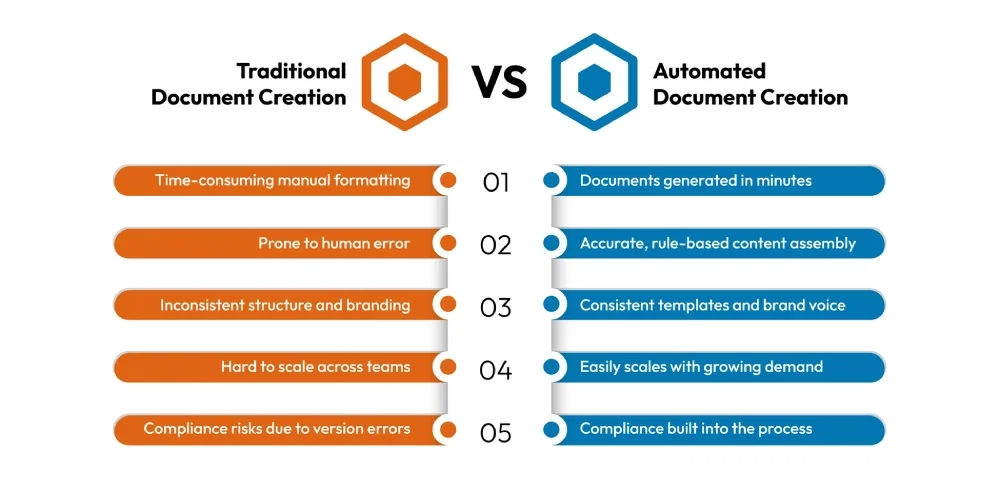
Traditional Document Creation vs. Automated Document Generation
The difference between traditional and automated document creation is about control, compliance, and scale. See how the two approaches stack up.
Why Businesses Are Turning to Document Generation Software
As companies expand, the volume and complexity of their documents expand right along with them. What used to be just a few word templates and some manual formatting has now become a huge part of everyday business, especially in industries such as insurance and finance, where there are requirements to meet multiple international and state regulations in each and every document while keeping the content tailored to customers.
Today, document generation isn’t just a productivity hack. It’s part of a bigger shift toward automating workflows with document management systems that really focus on speed, accuracy, and control.
So, what’s pushing this change?
Well, a few big things, really:
- Time wasted: On average, employees spend nearly two hours each day searching for documents—time that could be better spent on meaningful work.
- Data underused: Around 87% of companies admit they’re not great at using their analytics and business intelligence tools. That means teams often don’t get the right data to fill documents, which leads to errors or missing information.
- The digital rush: By 2025, about 70% of businesses will have digital platforms running across their whole tech stack. Document generation is a big part of making that happen.
- Revenue on the line: Companies that drag their feet on digital transformation could lose nearly 40% of their revenue to competitors who move faster.
- Cloud on the rise: Cloud-based document generation will probably make up over 40% of the market by 2025. That shows businesses want solutions that scale easily and connect well.

Revamp Your Customer Communication Management with Advanced Document Generation Software – Discover the Benefits!
Boost efficiency, build trust, and strengthen customer relationships.
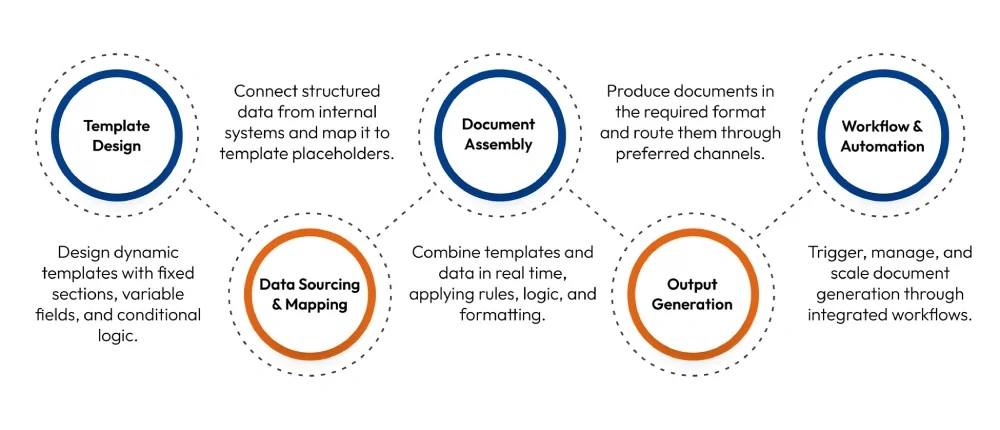
How Does Document Generation Work? The 5-Step Workflow
Documentation generation software doesn’t work in the dark. You build the logic. You set the rules. And it follows them exactly how you want. It connects with your systems, pulls in data, and produces documents that look like a human made them—only quicker. The best part? It’s repeatable, reliable, and easy to tweak if things change.
Here’s how the process flows, step by step:
1. Template Design: Building the Foundation
- Every document starts with a template. But these aren’t static files; they’re dynamic blueprints.
- Templates define the layout, structure, and branding.
- Variable fields are indicated for dynamic data, whereas static parts (such as legal disclaimers) are fixed.
- Conditional logic allows sections to appear or disappear based on rules. For example, include a termination clause only for 12-month contracts.
2. Data Sourcing and Mapping: Feeding the Engine
- The system requires structured data from trustworthy sources in order to produce papers at scale.
- Platforms such as CRMs, ERPs, or other databases are the source of the data.
- A distinct data point (such as {Client_Name} or {Start_Date}) is mapped to each field in the template.
- The document management system may also receive data directly from web forms, APIs, and internal tools.
3. Document Assembly: Where Logic Meets Output
- Once data is mapped, the system assembles the document in real time.
- Dynamic fields are populated instantly.
- Business rules determine which sections to include, exclude, or modify.
- Calculations (e.g., payment schedules, policy premiums, transactions, etc.) are performed automatically once you feed the required information.
- Style guidelines and formatting are applied automatically.
4. Output Generation: Delivering in the Right Format
- The final document can be packaged in different formats, depending on what it’s needed for.
- Common outputs include: PDF, Word, HTML, Excel, or even PowerPoint while complying with international standards PDF/UA.
- Documents can be generated individually or in batches.
- They can be routed directly to email, document portals, or e-signature platforms.
- Archival copies are stored automatically for audit, retrieval, or compliance needs.
5. Workflow & Automation: Integrating with Business Processes
- Document generation doesn’t exist in isolation. It’s most powerful when embedded into wider workflows.
- You don’t have to hit “go” every time. Automation can be triggered by real-world events. For instance, someone fills out a form, a policy is about to renew, or a CRM deal moves forward.
- Tasks like approvals or reminders can happen side by side, instead of waiting in a line. It keeps things moving.
- Let’s say you need to send out 200 updated agreements. The batch generation handles that in one shot.
- If anything’s outdated, such as a contract clause or legal terms, the system points it out so you can fix it before it becomes a problem.
Types of Documents You Can Automate
Document generation is especially valuable in high-document-volume industries like insurance and finance. Below is a breakdown of commonly automated documents in each sector:
| Insurance Industry | Financial Services Industry |
| Policy documents | Client onboarding forms |
| Claims letters | Investment proposals |
| Renewal notices | Financial statements |
| Coverage summaries | Regulatory disclosures |
| Premium invoices | Risk assessment reports |
| Welcome kits | Portfolio summaries |
| Endorsements | Term sheets |
| Compliance notices | KYC/AML documentation |
| Claim settlement forms | Internal approval memos |
| Annual benefit letters | Account closure notifications |
For insurance and finance teams, especially, this changes everything. It delivers faster results while staying compliant with changing rules. Every document pulls real-time data from connected systems, so whether you’re creating five documents or five thousand, the quality stays the same.
How to Choose the Right Document Generation Software
If you’ve evaluated these platforms before, you know it’s not always the flashy features that cause trouble. The real issues tend to surface later—limited formatting, poor integrations, or tools that seem solid in demos but stumble under the real workload.
The right document generation tool isn’t just about creating documents—it needs to fit into how your team already works, meet your compliance standards, and scale well as you grow.
Here’s a lean and practical checklist:
Template Flexibility
- Does it support dynamic templates with conditional logic, or are you stuck with static ones?
- Can you update or reuse templates easily, or do you have to wait for a developer?
Integration Readiness
- Will it connect smoothly to your CRM, ERP, forms, or APIs?
- Does it pull data in real time, or do you have to upload static files manually?
Output and Format Control
- Can it generate documents in multiple formats like PDF, Word, HTML, etc.?
- Does it handle batch generation and multi-channel distribution?
Scalability and Performance
- Will it support growing volumes without breaking or slowing down?
- Is there clear documentation for automation, APIs, or workflow triggers?
Usability and Adoption
- How difficult is it for business users to get up to speed compared to technical users?
- Are features like template management, version control, and audit tracking available?
Compliance and Security
- Does it support role-based permissions, data encryption, and document retention policies?
- Is the system aligned with standards like HIPAA or GDPR?
Vendor Reliability
- Is real-time support available from document generation providers, or do they rely solely on self-service options like help centers and knowledge bases?
- Have they shown measurable ROI or lasting success with organizations like yours?
Choosing document generation software isn’t about going for the one with the longest feature list. It’s about picking the one that matches how your team works now and can grow with your needs later.
Why PDF/UA Should Be a Core Requirement in Your Document Workflow Automation
When teams choose document generation software, the focus is usually on usability, integrations, and performance. But one important factor often comes up too late: compliance with international PDF accessibility standards.
PDF/UA (Universal Accessibility), also known as ISO 14289, ensures that PDF documents are accessible for users with disabilities.
This means PDFs must be created with:
- Tagging structures that define content hierarchy
- Logical reading order
- Alt text for non-text elements
- Labeled form fields, tables, and links
- Why It Matters More Than Ever
With 1.3 billion individuals worldwide with a disability, creating accessible digital communication is not only a moral responsibility but also increasingly mandatory under the law. Adhering to PDF/UA accommodates a diverse set of regulations, such as:
- Section 508 (U.S.)
- ADA – Americans with Disabilities Act
- WCAG 2.1 – Web Content Accessibility Guidelines
- European Accessibility Act (EAA) and France’s RGAA
Conclusion: From Smarter Documents to Smarter Decisions
We started with one simple question: What is document generation, and why does it matter now?
The response is obvious. In a world in which speed, precision, and compliance are mandatory, document generation is no longer a nice-to-have but a foundation. However, selecting suitable document generation software involves moving past glitzy features. You require a platform that is proven, versatile, and designed with scale in mind.
Cincom Eloquence is far more than just another document generation product.
It’s an enterprise-grade solution that unifies template design, dynamic data integration, and multi-format delivery while ensuring every document meets industry compliance standards like PDF/UA.
Whether insurance or financial services, Cincom Eloquence enables you to produce smarter, faster, and compliant communications at scale.
If workflow streamlining of documents is on your agenda, it is high time you considered Eloquence.
FAQs
1- How does document generation improve accuracy and reduce errors in document creation?
Document generation eliminates manual copy-paste, formatting, and data entry—common sources of human error. By using pre-approved templates and pulling data directly from source systems like CRMs or ERPs, it ensures consistent language, up-to-date information, and version control. Built-in business rules and conditional logic further reduce the risk of omissions or inconsistencies across documents.
2- Is document generation secure and compliant with industry regulations (e.g., GDPR, HIPAA)?
Yes. Enterprise-grade document generation software offers robust security features, including access controls, encryption, audit trails, and role-based authorizations. Reputable providers also support compliance with regulations such as GDPR, HIPAA, SOC 2, and ISO 27001, helping you meet industry-specific data privacy and security requirements.
3- How long does it take to implement a document generation solution, and what’s involved in the process?
Implementation timelines can vary based on complexity. The process typically involves:
- Template design and configuration
- Data source integration (e.g., CRM, ERP)
- Workflow setup and business rule definition
- Testing and training
4- Can document generation integrate with existing systems?
Yes. The majority of leading platforms facilitate seamless integrations or API-based connections with various systems such as CRMs, ERPs, policy admin systems, and core databases. This ensures real-time data population and seamless process automation without duplicating effort.
5- What should you look for in document generation providers?
Choose a provider with industry expertise, scalable infrastructure, and strong integration capabilities. Look for compliance support (e.g., GDPR, PDF/UA), dynamic templates, responsive customer service, and a proven track record of secure, reliable deployments. The right provider should be a long-term partner, not just a software vendor.


